Paddle Billing subscriptions Next.js starter kit
Paddle Billing is the developer-first merchant of record, designed for modern SaaS, AI, mobile app, and digital product businesses. We take care of payments, tax, subscriptions, and metrics with one unified API that does it all.
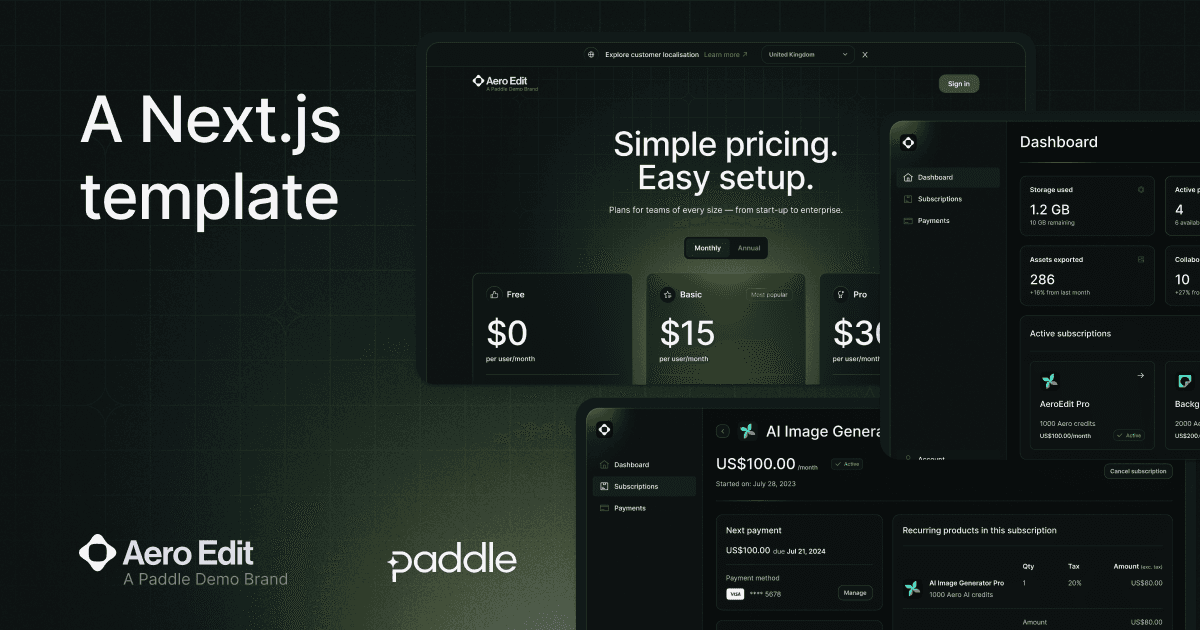
This is a complete starter kit that you can use to build and deploy a Next.js SaaS app powered by Paddle Billing.
Important: This starter kit works with Paddle Billing. It does not support Paddle Classic. To work with Paddle Classic, see: Paddle Classic dev docs
Demo
See it in action: https://paddle-billing.vercel.app/
Features
- Three-tier pricing page that's fully localized for 200+ markets using Paddle.js.
- An integrated checkout experience built with Paddle Checkout, with secure optimized payments by card, Apple Pay, Google Pay, PayPal, and others.
- User management and auth handled by Supabase.
- Ready-made screens to let customers manage their payments and subscriptions.
- Automatic syncing of customer and subscription data between Paddle and your app using webhooks.
Stack
This starter kit is built with:
- Framework: Next.js
- Auth and user management: Supabase
- Component library: shadcn/ui
- CSS framework: Tailwind
- Billing solution: Paddle Billing
Prerequisites
Local dev environment
Accounts
- Vercel account
- Supabase account
- Paddle Billing — sandbox recommended
Step-by-step setup
Important: If you're totally new to Next.js and Paddle, we have a more complete tutorial on our dev docs: Build and deploy Next.js app with Vercel and Supabase
1. Deploy on Vercel
Start deployClick this button to clone this repo and create a new project in your Vercel account:
You can also create a new application manually.
Configure projectClick Add to walk through integrating with Supabase. You'll be asked to authenticate with Supabase and confirm creating the database schemas.
Then, enter Paddle environment variables:
| Variable | Used for | How to get it |
|---|---|---|
PADDLE_API_KEY | An API key, used for interacting with Paddle data in the backend. For example, syncing customer and subscription data with Supabase. | Go to Paddle > Developer tools > Authentication and create a new API key. |
NEXT_PUBLIC_PADDLE_CLIENT_TOKEN | A client-side key, used for interacting with Paddle in the frontend. For example, getting localized prices for pricing pages and opening a checkout. | Go to Paddle > Developer tools > Authentication and create a new client-side token. |
PADDLE_NOTIFICATION_WEBHOOK_SECRET | A secret key used for verifying that webhooks came from Paddle and haven't been tampered with in transit. Important for security. | Go to Paddle > Developer tools > Notifications, create a new notification destination for your Vercel deploy URL + /api/webhook, then edit to copy the secret key. See below for more information. |
NEXT_PUBLIC_PADDLE_ENV | Environment for our Paddle account. This should match the kind of Paddle account you signed up for. | Enter sandbox for sandbox accounts or production for live accounts. |
Use https://<PROJECTNAME>.vercel.app/api/webhook as the endpoint URL for your notification destination, where <PROJECTNAME> is the name of your project in Vercel. For example, https://paddle-billing.vercel.app/api/webhook.
If your project name isn't unique, your Vercel deploy URL may not match the URL you enter here. We can review and update this after deploy.
DeployClick Deploy when you're done. Wait for Vercel to build.
2. Set up product catalog
Clone locally-
Clone the repository you created earlier.
git clone https://github.com/PATH_TO_YOUR_REPO -
Install dependencies using npm, Yarn, or pnpm.
Install using npm:
npm installInstall using Yarn:
yarn installInstall using pnpm:
pnpm install
Create products and prices in Paddle for your subscription plans. We recommend creating three products for your plans, with two prices for each product to describe how you bill. For example, create a product called "Pro plan" with two prices for "monthly" and "annual."
Next, copy your price IDs and update the pricing-tier.ts constants file with your new prices.
Commit and push your changes to main.
3. Add URL to Paddle and test
Add deploy URL to PaddleYou must add URLs to Paddle before you can launch a checkout from them. This protects you as a seller, making sure that only you're able to sell your products.
- Go to Paddle > Checkout > Website approval, then enter your Vercel demo app link and click Submit for approval.
- Go to Paddle > Checkout > Checkout settings, then enter your Vercel demo app link as your default payment link and click Save.
- Go to Paddle > Developer tools > Notifications, then check that the endpoint URL matches your Vercel demo app link domain.
TestImportant: Website approval is instant for sandbox accounts, but may take a little while for live accounts while the Paddle seller verification team check your website.
Open your Vercel demo site. You should notice that Paddle returns the prices you entered for each of your plans on your pricing page.
Click Get started to launch a checkout for a plan, then take a test payment.
If you're using a sandbox account, you can take a test payment using our test card details:
| Field | Value |
|---|---|
| Email address | An email address you own |
| Country | Any valid country supported by Paddle |
| ZIP code (if required) | Any valid ZIP or postal code |
| Card number | 4242 4242 4242 4242 |
| Name on card | Any name |
| Expiration date | Any valid date in the future. |
| Security code | 100 |
After checkout is completed, head back to the homepage and click Sign in. Have a look at the subscriptions and payments pages. They pull information from Paddle about a customer's subscriptions and transactions.
4. Next steps
You're done! 🎉 You can use this starter kit as a basis for building a SaaS app powered by Paddle Billing.
Once you've built your app, transition to a live account to start taking real payments:
- Sign up for a live account, then follow our go-live checklist to transition from sandbox to live.
- Update your environment variables so they're for your live account.
- Create new schemas in Supabase for your live data.
- Set up Paddle Retain to handle payment recovery.
Get help
For help, contact the Paddle DX team at team-dx@paddle.com.